Posts

Showing posts with the label VisualForce

Pagination Concept in Salesforce
Image
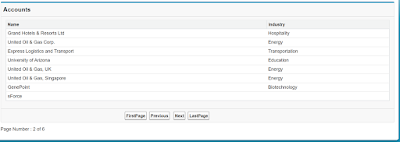
This post describe How to implement concept of Pagination with custom controller. During the Pagination of your records you have to take care of these two things First is "How many records/rows you are going to display on the page" and  second one is  "On what condition First,Last,Pre and  Next button will be clickable " Here you can find the logic of both. VF Page <apex:page controller="PaginitionMthd">     <apex:form >         <apex:pageBlock title="Accounts">             <apex:pageBlockTable value="{!accList}" var="a" id="fresh">                 <apex:column headerValue="Name">                     <apex:outputText value="{!a.name}"/>                 </apex:column>              ...

How to show or hide a particular section of Visualforce Page dependent upon picklistfield value

Image
In this example, I am going to explain that how to show/hide a particular section of Vf Page that depends on a picklist field value i.e. for a specific picklist value you are showing/hiding a particular part of a VF Page. This can be achieved by using both the Standard Controller and as well as Custom controller functionality. Here I am using Standard Controller functionality. VF Page--- < <apex:page standardController="Contact">   <apex:form id="frm">       <apex:pageBlock >           <apex:pageBlockSection >               <apex:inputField value="{!contact.LeadSource}">                   <apex:actionSupport event="onchange" reRender="frm"/>               </apex:inputField>            </apex:pageBlockSection>      ...

How to redirect to another Vf page after saving a record

To redirect to another page which is saved in your organization, use the standard feature provided by Salesforce  PageReference . A PageReference is a reference to an instantiation of a page. This example explains the process of redirecting to another VF Page when you save an account record.                                            Example Controller-- public class MyExtension  {     public Account ac {get;set;}          public MyExtension(ApexPages.StandardController controller)      {         ac = new Account();            }          public PageReference save()     {         insert ac;         PageReference pg = new PageReference('/apex/SecondVFPage');//Second //VFPage ...

Update a sObject record related with another sObject using Visualforce

Image
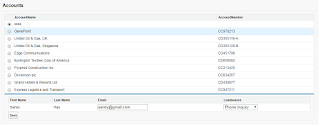
In this part, I am going to explain how to update a contact record related to an account object in the visualforce page. Scenario--  A VF Page showing a list of account record with a radio button and when you select an account from given list then it shows related contacts of selected account in the page and then you can update your record. Controller-- public with sharing class AllAccounts  {     public List<Account> acList {get;set;}     public List<Contact> conList {get;set;}        public string accId {get;set;}     public string eml {get;set;}          public AllAccounts()     {            acList = new List<Account>();         for(Account a : [select id,name,accountnumber from account limit 10])         {             acList.add(a);     ...

Dependent Picklist in Visualforce Page

Image
In this part, I am going to explain how to create a dependent picklist via some code. You can do this stuff without coding i.e. (point and click) tool for a sObject record. There are two terms that depict about FieldDependencies. 1.   Controlling Field 2.    Dependent Field Field dependencies are the filters that allow us to change the content of a picklist based on a value of another field. Controlling field that controls available values in one or more corresponding dependent picklist. A dependent field display values based on a value selected in the corresponding controlling field.                                            Example Contoller -- public with sharing class CreateDependentPicklist  {     public String selectedtState {get;set;}      public String selectedCtr {get;set;}     ...

Dynamically Add/Delete rows in Visualforce Page

Image
Here is a simple example of adding or deleting rows dynamically in a VF page using the concept of Wrapper Class. Controller-- public with sharing class AddNewRows {     public List<ContactWrapper> cwrap {get;set;}     public Contact con {get;set;}     public Integer rowIndex {get;set;}          public AddNewRows(ApexPages.StandardController controller)     {         rowIndex = 0;         cwrap = new List<ContactWrapper>();         con = new Contact();         cwrap.add(new ContactWrapper(con,0));  //call ContactWrapper class //constructor     }          public void addRows()     {         rowIndex += 1;         Contact c = new Contact(); // create new instance of object         cwrap.add(new Contact...

How to search a sObject record using visualforce page

Here is a simple example that searches a standard or custom object record like we do in our salesforce organization's search bar. After searching record, you can do your custom action like delete, edit etc. VF Page-- <apex:page controller="AccountSearch">     <apex:form >       <apex:pageBlock >                          <apex:inputText value="{!searchStr}"/>               <apex:commandButton action="{!doSearch}" value="Find" reRender="lab"/>                  </apex:pageBlock>              <apex:pageBlock >           <apex:pageBlockTable value="{!acList}" var="ac" id="lab">               <apex:column headerValue="Name">         ...

Individually Delete sObject records in Visualforce Page using concept of Wrapper Class

Image
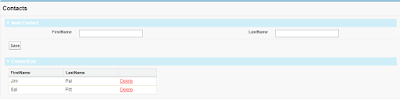
Wrapper Class means a class inside another class. Definition-- A wrapper class is a class whose instances are the collection of other objects. Wrapper class is used to display different object on a visualforce page in the same table Scenario is like this when we create a contact record in visualforce page, then VF page show recently created record like this-- First the controller public with sharing class SingleRecordDelete {     public String fname {get;set;}     public String lname {get;set;}     public String did {get;set;}          public List<ContactWrp> crp {get;set;}          public SingleRecordDelete(){         crp = new List<ContactWrp>();              }          public void save(){       Contact c = new Contact();       c.firstname = fname; ...