Posts

Showing posts with the label Apex

Custom File Upload to Salesforce using LWC and Apex

Hi Everyone, In this blog, we'll explore custom way of uploading a file to salesforce using Apex and lightning-input tag.  A file can be uploaded using either lightning-file-upload component or lightning-input (having type attribute as "file") component. Only difference between lightning-file-upload and lightning-input with type as 'file' is that files uploaded by using file-upload component directly get attached to records without writing any additional apex code, whereas you need to write Apex code for attaching files to record while using lightning-input component. Some important points Multiple files can be uploaded by having multiple attribute in component definition. All types of files are accepted and furthermore you can restrict what kind of file you want to upload by specifying valid file formats in accept attribute. Ex:- [".pdf", ".doc", ".jpg"] Uploaded files can be associated to a record by specifying record-id attri...

Client Side Pagination in LWC Component

Image
 Hi Folks, Hope you all are well !! In this post, we are gonna implement a simple client side pagination. Making use of client side pagination is much more simple then having all logic into Apex Class and doing SOQL on each click of Pre and Next button. Let's simplify pagination in below steps :- Get all the result in single Apex call. Hold the main result to a object type variable which further will be used to process the logic on each pre/next button click. Decide how many records needed to show on the page. Process the logic for displaying default number of records and when click on pre and next button. Handle the logic when records on page got changed. for the pagination logic, we have created a separate (child component) which will takes some property from its parent component and will process it accordingly. (Reusability feature). paginationlwc.cmp <template>     <lightning-card title = {cardTitle} >         <div style = "height:...

Pagination Concept in Salesforce

Image
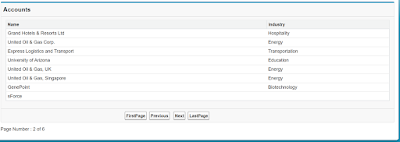
This post describe How to implement concept of Pagination with custom controller. During the Pagination of your records you have to take care of these two things First is "How many records/rows you are going to display on the page" and  second one is  "On what condition First,Last,Pre and  Next button will be clickable " Here you can find the logic of both. VF Page <apex:page controller="PaginitionMthd">     <apex:form >         <apex:pageBlock title="Accounts">             <apex:pageBlockTable value="{!accList}" var="a" id="fresh">                 <apex:column headerValue="Name">                     <apex:outputText value="{!a.name}"/>                 </apex:column>              ...

Collection Data Types in Salesforce

Collection-- A collection is a group of similar type element. It is the framework that provides Classes and Interfaces for grouping of the similar type elements. There are three types of collection in Apex-- 1. List--               A list is the ordered collection of elements which are distinguished by their index. List element can be of any data type(Integer, String, or sObject). so use list collection whenever you want to identify an element by their index. List<String> sList = new List<String>();   sList.add('Jon');   sList.add('smith');   system.debug(sList.size()); 2. Set-- A set is an unordered collection of elements that don't contain any duplicate element. Set can be any dataType (Integer, String, or sObject). So use set when you don't want any duplication in your collection. Set<String> str = new Set<String>();    str.add('Jane');     str.add('...

Update a sObject record related with another sObject using Visualforce

Image
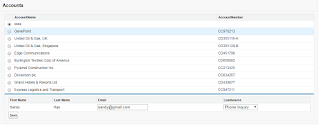
In this part, I am going to explain how to update a contact record related to an account object in the visualforce page. Scenario--  A VF Page showing a list of account record with a radio button and when you select an account from given list then it shows related contacts of selected account in the page and then you can update your record. Controller-- public with sharing class AllAccounts  {     public List<Account> acList {get;set;}     public List<Contact> conList {get;set;}        public string accId {get;set;}     public string eml {get;set;}          public AllAccounts()     {            acList = new List<Account>();         for(Account a : [select id,name,accountnumber from account limit 10])         {             acList.add(a);     ...

Dynamically Add/Delete rows in Visualforce Page

Image
Here is a simple example of adding or deleting rows dynamically in a VF page using the concept of Wrapper Class. Controller-- public with sharing class AddNewRows {     public List<ContactWrapper> cwrap {get;set;}     public Contact con {get;set;}     public Integer rowIndex {get;set;}          public AddNewRows(ApexPages.StandardController controller)     {         rowIndex = 0;         cwrap = new List<ContactWrapper>();         con = new Contact();         cwrap.add(new ContactWrapper(con,0));  //call ContactWrapper class //constructor     }          public void addRows()     {         rowIndex += 1;         Contact c = new Contact(); // create new instance of object         cwrap.add(new Contact...

Individually Delete sObject records in Visualforce Page using concept of Wrapper Class

Image
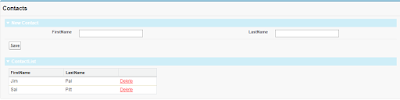
Wrapper Class means a class inside another class. Definition-- A wrapper class is a class whose instances are the collection of other objects. Wrapper class is used to display different object on a visualforce page in the same table Scenario is like this when we create a contact record in visualforce page, then VF page show recently created record like this-- First the controller public with sharing class SingleRecordDelete {     public String fname {get;set;}     public String lname {get;set;}     public String did {get;set;}          public List<ContactWrp> crp {get;set;}          public SingleRecordDelete(){         crp = new List<ContactWrp>();              }          public void save(){       Contact c = new Contact();       c.firstname = fname; ...