Posts

Using Lightning Message Service aka LMS in LWC

Hey, Welcome Folks !! Let's talk about LMS.  Before going to LMS, lets understand little bit about Lightning Message Channel. Lightning Message Channel is a metadata that stores communication parameters or message. Use this message channel to publish/subscribe the message. Lightning Message Service is unique salesforce feature that allows developers to communicate across the DOM within a Lightning Page (i.e. unrelated components) , using a secure message channel. See the LMS as Application Events in aura framework that allows communication between the components on an application. Using LMS, we can communicate between Visualforce Pages embedded into lightning page, Aura Components, Lightning Web Components, Utility bar components. There are three main steps to use LMS into you web components: Creating a Lightning Message Channel. Publishing the message to Message Channel. Subscribe/Unsubscribe from Message Channel. Creating a Lightning Message Channel Create a folder under force:ap...
Process Automation Specialist Superbadge

Hi Folks, This superbadge is all about to test one's automation skill using superb automation tools which salesforce provide. So, here i'm going to discuss every problem statements / business requirements of Process Automation Specialist superbadge and convert them into a problem solving flow. I would rather say read twice or thrice unless you are not clear with problem statement /requirement to every challenges of this superbadge, doing so, will give you a clear picture  of problem statement. Challenge-1 : Automate Leads Step-1 :  Validation rule on Lead to verify Country and State field. Lead Country must be either US , USA or United State or it can be blank.  Lead State must be valid 2-digit US state.                Steps-2 : Create Two Queues 1. Rainbow Sales. 2. Assembly System Sales. Create an lead assignment rule and make 2 rules entries and give order accordingly. Based on LeadSource value lead should be a...

Trigger and Trigger Context Variables

Hello Devs, hope you all doing well. In this post I'm gonna talk about trigger context variables in details, their consideration and which context variables is available in which trigger event i.e before/after DML. First let's talks about some basics. Trigger is a piece of Apex Code that execute before or after DML operations. There are two types of trigger:-   Before Triggers are used to assign/validate record field values before they are saving to database.   After Triggers are used to update other records by accessing current record's field (record that is in      transaction) which are set by system (mostly we use Id and date fields). Triggers can cause other records to change, and these changes also can, in result, it fires more triggers so apex runtime engine consider all these operation a single piece of task and sets limits on number of operations that can performed to prevent infinite recursion. Now let's talk about trigger Implemen...

Pagination Concept in Salesforce

Image
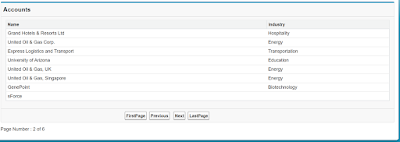
This post describe How to implement concept of Pagination with custom controller. During the Pagination of your records you have to take care of these two things First is "How many records/rows you are going to display on the page" and  second one is  "On what condition First,Last,Pre and  Next button will be clickable " Here you can find the logic of both. VF Page <apex:page controller="PaginitionMthd">     <apex:form >         <apex:pageBlock title="Accounts">             <apex:pageBlockTable value="{!accList}" var="a" id="fresh">                 <apex:column headerValue="Name">                     <apex:outputText value="{!a.name}"/>                 </apex:column>              ...

Show/Hide a particular section of VF Page

This post is part of the previous post. you can check here--- How to show or hide a particular section of Visualforce Page dependent upon picklistfield value   Here I am using the custom controller to achieve this functionality. Controller-- public class ShowMyContacts  {         public string source {get;set;}     public List<selectOption> sourceValue {get;set;}     public boolean flag {get;set;}     public boolean flag1 {get;set;}     public boolean flag2 {get;set;}     public Contact contact {get;set;}               public ShowMyContacts()     {         flag = false;         flag1 = false;         flag2 = false;         sourceValue = new List<selectOption>();         sourceValue.add(new selectOp...

How to show or hide a particular section of Visualforce Page dependent upon picklistfield value

Image
In this example, I am going to explain that how to show/hide a particular section of Vf Page that depends on a picklist field value i.e. for a specific picklist value you are showing/hiding a particular part of a VF Page. This can be achieved by using both the Standard Controller and as well as Custom controller functionality. Here I am using Standard Controller functionality. VF Page--- < <apex:page standardController="Contact">   <apex:form id="frm">       <apex:pageBlock >           <apex:pageBlockSection >               <apex:inputField value="{!contact.LeadSource}">                   <apex:actionSupport event="onchange" reRender="frm"/>               </apex:inputField>            </apex:pageBlockSection>      ...

Collection Data Types in Salesforce

Collection-- A collection is a group of similar type element. It is the framework that provides Classes and Interfaces for grouping of the similar type elements. There are three types of collection in Apex-- 1. List--               A list is the ordered collection of elements which are distinguished by their index. List element can be of any data type(Integer, String, or sObject). so use list collection whenever you want to identify an element by their index. List<String> sList = new List<String>();   sList.add('Jon');   sList.add('smith');   system.debug(sList.size()); 2. Set-- A set is an unordered collection of elements that don't contain any duplicate element. Set can be any dataType (Integer, String, or sObject). So use set when you don't want any duplication in your collection. Set<String> str = new Set<String>();    str.add('Jane');     str.add('...